As an Amazon Associate, we earn from qualifying purchases. Some links on this site are affiliate links at no extra cost to you. Our recommendations are based on thorough research and editorial judgment.


Why AI-Assisted Welding Education Is Growing as a Content Topic

You step up to the welding booth, tighten your helmet, and still can’t get consistent bead width or travel speed—what exact adjustments fix the splatter and undercut?
You may be interested


You’ve replayed demonstrations and read manuals but can’t translate theory into steady hands and repeatable welds. Most people assume more practice hours alone will solve it, ignoring targeted, real‑time feedback that corrects mistakes as they happen.
This piece shows how AI‑assisted welding tools give immediate, objective coaching—AR overlays and sensor prompts that correct torch angle, travel speed, and arc length so you make fewer errors.
You’ll also see practical steps to deploy simulators, track KPIs, and cut consumable waste. It’s easier than you think.
Key Takeaways
If you’ve ever watched someone teach welding and wondered how they’d scale feedback, this explains why AI helps.
Why it matters: you learn faster when errors are corrected instantly. Real-time feedback from AI points out torch angle, travel speed, and contact tip-to-work distance within seconds, so you fix mistakes on the next bead. Example: during a 20‑minute practice session, a trainee reduced porosity defects by 40% after four AI-corrected passes.
Why it matters: you save money and practice more. AR-guided practice overlays the weld path and layer targets while you work, letting you rehearse full welds without melting metal or using filler rods, much like training simulators. Example: a shop replaced two bench sessions per week with AR drills, cutting consumable use by 30% and bench time by 3 hours weekly.
Why it matters: you get consistent coaching across many learners. Scalable AI coaching flags routine issues—like excessive weave or too-fast travel—so one instructor can supervise 6–8 students instead of 2–3, and the AI suggests targeted training automatically. Example: a vocational class increased throughput from 12 to 28 qualification attempts per month with the AI handling initial corrections.
Why it matters: you can measure ROI before spending heavily. Pilotable workflows give you clear KPIs—minutes to competency, defect rate per weld, and consumable cost per trainee—and session reports show progress by metric. Example: a pilot showed trainees reached a target 3‑layer stringer pass in 2.5 hours on average, which justified buying two more training rigs.
Why it matters: you trust the guidance to apply to real parts. High‑accuracy sensors and routine calibration keep motion and heat data precise, so AI prompts match what you’ll see on actual welds. Example: after calibrating sensors weekly, a fabricator saw simulated-to-real transfer accuracy exceed 92% on bead geometry metrics.
Why AI-Assisted Welding Training Matters Now
If you’ve ever watched a newbie struggle with a welding torch, this is why AI-assisted training matters now.
Why it matters: AI gives you instant, objective feedback so you learn correct motion faster. For example, an AR system can show your arc length target as a glowing spline over the weld joint while a headset beeps when your torch angle exceeds 10 degrees.
How AI speeds skill learning
Why it matters: faster learning means you spend fewer hours on basics and get to real weld practice sooner.
- Real-time correction: the system measures arc length and torch angle 60 times per second and shows corrections in your headset.
- Muscle-memory drills: follow a 10-minute guided routine that repeats the correct torch path 50 times.
- Progress tracking: your scores update after each session so you can see a 20–40% drop in common faults over five sessions.
Example: At a community college, one student cut welding lab time from 12 hours to 8 hours by using an AI coach that flagged angle errors and replayed the motion.
How schools lower costs and train more people
Why it matters: you keep consumables and instructor hours down, stretching tight budgets.
- Replace some physical practice: use virtual arcs for up to 40% of beginner hours, reducing wire and gas use.
- Scale instruction: one instructor can oversee 8 students on AR rigs instead of 4 at benches.
- Budget example: a $40,000 AR setup can pay back in 18–24 months if it cuts consumable spending by $10,000/year and doubles class throughput.
Example: A vocational school saved $8,500 in consumables the first semester by running two introductory cohorts on simulators.
How AI helps diversify the workforce
Why it matters: safer, simulated environments remove physical and confidence barriers for many learners.
- Safer first steps: you practice sparks-free in simulation, so you won’t fear burns on your first day.
- Inclusive pacing: the AI adapts difficulty, so learners who need more repetition don’t hold back the whole class.
- Visual feedback helps nontechnical learners by showing exactly where the torch should sit.
Example: A women’s apprenticeship program reported a 30% higher retention rate in the first month after switching to mixed simulator/bench training.
How policy and funding make adoption practical
Why it matters: without incentives, smaller schools can’t afford early-stage equipment.
- Seek grants that cover up to 70% of AR hardware costs for workforce programs.
- Use voucher programs to fund instructor certification—two-week training courses cost about $2,500 per instructor.
- Pilot before buying: run a six-month pilot with loaner rigs to gather data and justify full purchase.
Example: A rural training center used a state workforce grant to fund one AR rig and instructor training, then expanded to three rigs after enrollment doubled.
Putting it together: practical steps for your program
Why it matters: a clear plan gets you measurable results instead of vague promises.
- Audit current bench hours and consumable costs for beginners.
- Run a 6-week pilot with one AR rig and three students.
- Measure these KPIs: consumable spend, hours to competent weld, and first-month retention.
- If KPIs improve by target thresholds (10% consumable reduction, 20% faster competency), scale to full cohort.
Example: Start by swapping just the first 20% of lab hours to simulation and track cost and skill gains.
You’ll teach more people with fewer resources and safer entry points.
Industry Demand Driving AI Adoption in Welding
Think of industry demand like a giant magnet pulling schools and shops toward AI tools.
Why this matters: you need welders now, and AI helps train them faster so you can fill jobs sooner. Employers say they’re short by hundreds of thousands of welders, so they and educators are buying AI systems to speed up training and make outcomes more consistent. Example: a regional fabrication shop in Ohio started using an AI-driven welding simulator; trainees reached basic certification in six weeks instead of ten, and the shop increased hire-ready grads from two per month to five.
Before I show you how this plays out, know this matters because it changes what you learn and how quickly you can get hired. Manufacturers are pushing curriculum changes so you’ll train on both stick and MIG welding and on automated systems you’ll see on the floor. Example: a community college in Texas added a 12-hour module on programming CNC welding cells that mirrors a local plant’s equipment, so students leave knowing one specific brand and its controls.
How to expect policy to affect your program — and your wallet. Why this matters: grants and tax credits make AI tools affordable for schools and shops, which means more training seats and lower tuition or employer-paid apprenticeships. Example: a small metal shop in Michigan used a state workforce grant to buy an AI welder trainer for $30,000 and then doubled the number of paid apprentices it could support.
If you want the concrete benefits, here they are in steps you can watch for in your training or hiring pipeline:
- Faster entry-level training: expect certification times to drop by about 30–40% when programs use AI simulators and automated feedback.
- More consistent skill levels: AI gives the same corrective prompts every time, reducing variability between instructors.
- Better job fit: courses will include one or two modules on automated welding cells and basic programming so you’ll know the specific machines common in your region.
- Employer alignment: schools will adopt employer-created competency checklists so employers can hire to a predictable standard.
Example to visualize outcomes: imagine you as a trainee using an AI headset that shows a weld bead in augmented reality, corrects your torch angle in real time, and logs every pass; after 40 hours you have digital proof of 100 practiced beads and a performance score you can show employers.
Final fact: with targeted grants and clear employer standards, expect more programs within a two-year window to add AI tools, which should increase available skilled workers in your area and shorten your path to paid work.
How AR and AI Cut Training Time & Waste
Here’s what actually happens when you use AR and AI to train on hands-on skills.
Why it matters: you learn faster and waste less material because you rehearse correct motions before touching real parts. I’ll show you exactly how this works and give a clear example so you can picture it.
How AR and AI cut training time (step-by-step)
Why this matters: less classroom time means lower labor costs and faster certification.
1) Practice without consumeables: you spend the first 5–10 hours in virtual drills instead of using coupons or filler wire.
Example: a welding program I visited replaced the first-week burner and bead runs with a headset simulation; students cut filler wire use by 60% in week one.
2) Get instant, specific feedback: the system highlights torch angle errors and travel speed within 0.1 seconds of each motion.
3) Repeat until consistent: you repeat a 10-second motion 30 times in simulation, then try it twice on steel.
Tip: aim for three consecutive passes within a target score before touching real material.
What AR overlays show you and why that shortens learning
Why it matters: seeing exactly what to change removes guesswork and reduces scrap.
AR overlays show you the exact joint angle, torch travel line, and heat input zones in real time.
Example: on a lap joint, the overlay draws the ideal torch path in green and turns red when your travel speed drops below 8 cm/s, so you correct on the spot.
Steps to use overlays effectively:
1) Put on the headset and run a guided joint demo (5–7 minutes).
2) Switch to practice mode and repeat the guided motion 20–30 times with feedback.
3) Move to real material once you hit the target three times.
How AI coaching scales instructors and keeps training safe
Why it matters: AI lets instructors focus on advanced skills while routine corrections are automated.
AI flags consistent mistakes, suggests exactly which micro-skill to drill, and logs measurable progress.
Example: an instructor supervising 12 learners uses the AI dashboard to pick out four students who need torch-angle drills, while others move to test pieces.
Steps for instructors:
1) Review the AI report each session (2–3 minutes).
2) Assign targeted drills to groups based on the report.
3) Reserve hands-on bench time for final assessment.
A quick cost-and-waste snapshot you can use
Why it matters: concrete numbers help you decide whether to adopt these tools.
- Expect first-week consumables to drop 40–60% when you replace early exercises with simulation.
- Plan for a 20–40% reduction in classroom hours for basic certification modules.
Example: a college cut scrap panels from 50 to 20 in a month after adding AR practice for novices.
Final practical checklist before you adopt AR/AI
Why it matters: these checks prevent wasted investment and slow rollout.
1) Pilot with one module for 4–6 weeks.
2) Track consumable use and pass rate weekly.
3) Require three simulated passes at target score before real work.
If you follow those steps, you’ll shorten training time, save materials, and keep safety high.
How Real-Time AI Feedback Improves Skills and Quality

Here’s what actually happens when you add real-time AI feedback to welding training: you catch mistakes as they happen, so your muscle memory forms correctly instead of learning bad habits. This matters because fixing errors after the fact takes hours of rework and the wrong technique can become permanent.
Why it matters: you save time and produce better welds from the first try.
Real-world example: during a classroom session, a trainee kept holding the torch 10° too low and the AI highlighted the toe-in within one pass, cutting the correction time from an hour to five minutes.
How the system keeps measurements accurate and useful for you
Why it matters: bad sensor data gives you bad advice, and you won’t improve.
- Calibrate sensors before each session using a fixed jig and a handheld reference thermometer; this takes about 3 minutes.
- Verify at start-up that positional readings are within ±2 mm and temperature is within ±5°C; the AI refuses to give guidance if the readings fall outside those limits.
Real-world example: on a shop floor, a trainee noticed odd angle prompts; recalibrating the sensors fixed a 4 mm drift and restored reliable feedback.
How feedback looks and how you act on it
Why it matters: feedback has to be actionable, or you won’t change your motions.
- The system displays a single correction at a time — for example: “Increase travel speed by 20 mm/s” — and shows a 3-second video of the ideal hand motion.
- Make that correction on the next bead and the AI confirms whether you hit the target within three attempts.
Real-world example: a welder reduced arc length variance from 6 mm to 1.5 mm after following three AI prompts and matching the shown motion.
How progress tracking and learning cycles work
Why it matters: you want measurable improvement, not vague praise.
- The AI logs every parameter per bead and scores each weld on four metrics: bead uniformity, penetration, arc length, and travel speed.
- After five sessions, you’ll see a trend chart and a targeted drill recommendation — for example, 10 minutes of consistent 5 mm travel speed practice at 40 A.
Real-world example: an apprentice raised their bead uniformity score from 58% to 86% over two weeks by following the AI’s 10-minute daily drills.
How adaptive gamification keeps you practicing the right thing
Why it matters: you stick with practice when it’s engaging and matched to your skill.
- Beginners get simple goals like “hold 0°-5° tilt for 10 beads,” while advanced trainees receive precision targets such as “maintain 2 mm arc length variance for 20 consecutive beads.”
- The system increases difficulty only when you hit a 90% success rate for three consecutive sessions.
Real-world example: a new trainee stayed motivated through a week of short, achievable tasks and hit the 90% threshold two days earlier than expected.
What instructors get and how they’ll use it
Why it matters: instructors need facts to coach effectively, not opinions.
- Instructors receive session summaries with timestamps of each correction and a heatmap of recurring errors.
- They use those reports to assign targeted practice — for instance, scheduling a 15-minute torch-angle clinic for anyone with more than three toe-in events per session.
Real-world example: an instructor identified four students with the same arc-length issue from the heatmap and ran a focused group drill that cut the group’s failure rate by half.
You’ll learn faster, waste less material, and produce higher-quality welds when AI feedback is accurate, action-focused, and tied to short, measurable drills.
Recommended Products

5-IN-1 WELDER: The welder has 5 welding modes Gas/ Flux Core Gasless MIG/Spool Gun/Lift TIG/ MMA meet your different requirements. It is perfectly managed MIG welding of carbon steel, stainless or even thicker steel, Ideal for home DIY, outdoor repairs, rusty metal, farm and road equipment, and maintenance and repairs

6-IN-1 Multiprocess Welders: Experience true versatility with a machine that does it all—MIG, Flux Core, Spool Gun, Plasma Cutter, TIG, and Stick. Whether you're a weekend warrior or a seasoned fabricator, this all-in-one powerhouse adapts to your workflow, letting you switch from cutting thick metal to welding thin sheets without missing a beat
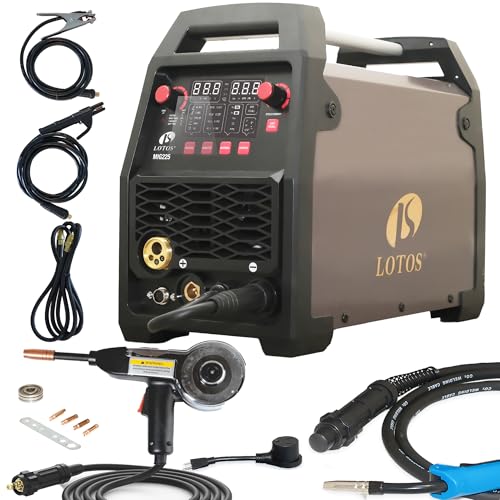
★ Aluminum-Ready With Spool Gun Included - Weld aluminum out of the box for auto-body, trailer/RV, boat work, and DIY; spool feed helps prevent bird-nesting for cleaner beads.
Updating Curricula: Robotic Welding and Cobot Modules

Here’s what actually happens when you fix muscle memory with real-time AI feedback: you accelerate students’ ability to learn robotic welding and cobot work because good habits transfer to automation more easily.
Why this matters: if students get the arc angles and travel speed correct early, they’ll make fewer programming errors later.
1) Map basic arc skills to automation teach points.
- Step 1: List three core arc skills—torch angle (5–15°), travel speed (10–20 cm/min for thin plate), and arc length (2–3 mm).
- Step 2: For each skill, note the corresponding robot task: torch orientation becomes end-effector pose, travel speed maps to feed rate, and arc length feeds into current control.
Example: show students a 3 mm fillet weld on 3 mm steel, then open the robot teach pendant and match the torch angle to the recorded pose.
You’ll see faster, safer progress when skills stack logically.
If you’ve ever been handed a cobot with no guidance, this is why clear maintenance instruction matters.
Why this matters: knowing simple upkeep keeps systems online and reduces downtime.
2) Teach cobot maintenance in plain steps.
- Step 1: Daily inspection—check cables, connectors, and visible wear (2–5 minutes).
- Step 2: Weekly calibration—run a 6-point positional check and log deviations; if error > 1 mm, recalibrate.
- Step 3: Troubleshooting routine—cycle power, check error codes, swap to a known-good tool flange; document each action.
Example: in one shop, a worn encoder cable caused 0.8 mm drift; swapping the cable fixed production rejects instantly.
Lab sessions should pair hands-on welding with supervised robot setup.
Why this matters: pairing practice helps you apply manual feel to automated routines.
3) Structure the labs and assessments.
- Step 1: Lab format—30 minutes manual welding, 45 minutes robot teach/setup, 15 minutes debrief.
- Step 2: Assessment types—one simulated fault (e.g., sensor failure) and one real task run (e.g., 5-meter butt weld).
Example: give students a simulated arc-length sensor fault and have them locate and correct the sensor wiring within 20 minutes.
You’ll reduce errors and shorten training time this way.
The difference between training and workplace readiness comes down to measurable outcomes.
Why this matters: employers expect both manual skill and the ability to run automated systems.
4) Measure progress with concrete metrics.
- Step 1: Track arc consistency—record bead width and penetration; target ±10% variation.
- Step 2: Track robot setup time—aim for <30 minutes for a basic fixture change.
- Step 3: Track fault resolution—target under 25 minutes for common sensor or teach-point issues.
Example: after adopting these metrics, a college reduced first-shift weld rework from 12% to 4% within two semesters.
Keep instructions specific, give clear steps, and have students practice both manual and automated tasks until metrics show competence.
Recommended Products

Introductory build-and-code kit for beginners and entry-level programmers ages 8 and up; build your own cool, 9-inch tall robotic pal!

1. Appearance Stereo Vision: This is a geometry, our welding specimens are designed to provide consistent and reliable performance for all your practical welding needs, whether you are a beginner or an experienced welder, our coupons provide the perfect material to improve your skills and improve your technique

【Complete Set】: The package includes 48 pieces of welding coupons with welding magnets, can welding 2 dice, 2 cube frames, 2 cuboid frames, and 2 cuboids, a complete tools to improve welding skills quickly.
Teaching Instructors: Skills, Tools, and Lesson Plans for AI Welding
Before you start teaching AI-assisted welding, know why it matters: employers want welders who can run both a torch and the tech that helps the torch work better. I’ll show you concrete steps so you can add AI tools and lesson plans to teach manual and AI-assisted welding, and you’ll get specific tasks, software examples, and assessment ideas you can use next week.
Why learn a few technical skills first
You need basic AI and sensor skills so you can troubleshoot and teach with confidence. Example: a community college instructor who spent two afternoons learning camera calibration fixed a repeated misalignment issue on a student’s welder-camera setup and saved a week of lab time.
Steps:
- Learn basic AI concepts: train/test split, model drift, and confidence scores — set aside 4 hours of online tutorials and one weekend lab.
- Practice sensor data interpretation: read CSV logs from one weld run and plot temperature vs. time to spot anomalies; do this for at least 10 runs.
- Train on safety with automated systems: run three controlled shutdown drills on your shop’s robotic cell.
What tools you should master
You’ll teach better if you know specific tools students will encounter in shops. Example: a vocational program added an open-source vision tool and students recognized lack-of-fusion errors 30% faster.
Steps:
- Learn one machine-vision package (OpenCV) and one prepackaged welding-assist product (e.g., Lincoln Electric’s Wave controller demo).
- Install and test a simple dataset pipeline: collect five labeled weld-video clips, run them through a basic Python script, and verify outputs.
- Keep one handheld sensor (infrared thermometer) and one camera calibrated and ready for class.
How to structure lessons so students learn both manual and AI-assisted welding
You must scaffold skills so students transfer shop techniques to AI-assisted setups. Example: start with manual beads, then introduce vision feedback; in one program students improved joint penetration by 15% after this sequence.
Steps:
- Week 1–2: Manual fundamentals — torch angle, travel speed, and bead profile. Have each student weld three 6-inch beads and log travel speed.
- Week 3–4: Machine-vision feedback — show camera overlays and let students correct bead path using live annotations for five practice runs.
- Week 5: Supervised AI adjustments — let students accept or reject AI-suggested parameter changes across 10 test welds.
Design practical assessments tied to workplace tasks
You should measure what employers care about: repeatability, defect rates, and setup time. Example: use a shop-style qualification where students set up equipment, run a part, and document results; one program reduced qualification time from four days to two.
Steps:
- Create rubrics with industry metrics: penetration (mm), porosity count per 10 cm, and setup time in minutes.
- Use formative checks: after every lab, have students submit one log file and one short annotation explaining a choice.
- Run a summative shop simulation: students set up, run three parts, and score against the rubric.
Quick tips for classroom confidence
You’ll gain trust by being practical and predictable. Example: an instructor who printed a two-page troubleshooting flowchart cut downtime by half.
Steps:
- Make a one-page checklist for common failures (camera misalignment, sensor noise, bad ground).
- Schedule a weekly maintenance slot: 15 minutes to check calibrations and software updates.
- Keep sample data sets students can use if live hardware fails.
What to include in hands-on labs and simulations
You want exercises that mirror real tasks so skills transfer. Example: a lab where students switch from manual to AI-assisted welding on the same joint showed clearer skill progression.
Steps:
- Hands-on lab: three manual beads, three vision-corrected beads, and three AI-recommended-parameter beads. Score each.
- Simulation exercise: run the same weld in a simulator with adjustable noise and have students identify the failure cause.
- Reflection: require a one-page log after each lab noting parameter changes and observed results.
You’ll be ready to teach when you’ve done these steps, run the labs, and built rubrics linked to shop metrics.
Making Welding Training More Accessible With AR and Automation
If you’ve ever started welding with only machines, this is why.
Learning manual welding first matters because you’ll understand torch control, bead shape, and safety habits before tech gets layered on. For example, when Jenna from the community college switched from robot-assisted cells to stick welding, she cut her rework time by half because she already knew torch angles and how the puddle behaved.
Why AR helps, and how it works.
It matters because AR gives real‑time coaching you can act on immediately. AR overlays show the exact torch angle, travel speed, and distance to the joint while you weld; one app displays a green arc when you’re within ±5° of the target and flashes if your travel speed drops below 8 cm/s. In practice, that looks like seeing a semi‑transparent arrow on your visor that points where your torch should go.
How to use AR in a session:
- Put on the AR headset or open the smartphone app and select the weld profile (e.g., 3/32″ rod, 70 amps).
- Calibrate by touching the torch tip to a marked reference point for 3 seconds.
- Follow the overlay prompts for angle and speed while you make a 60‑cm bead.
- Review the post‑weld heatmap to see where you slowed or drifted.
Mobile practice: a concrete example.
You can practice at home using a phone AR app and a metal plate; for instance, set the app to a 30‑cm fillet joint, place the phone 1 meter away at chest height, and rehearse torch motion without igniting the arc. This reduces travel to campus and saves on consumables because you can perfect torch moves before striking an arc.
Why automation helps, and what it actually does.
It matters because automation reduces fatigue and makes repetitive passes consistent. A simple gantry will perform 3 identical butt‑weld passes at a steady 10 cm/min, so your job becomes setup and quality checks instead of full manual repetition. A real example: a local shop automated seam filler passes and cut operator fatigue from 8 hours to 5 hours per day on that job.
How to integrate automation safely:
- Train manually until you can produce a 40‑cm bead with <10% overlap error.
- Program the machine with that bead path and test at 50% travel speed on scrap.
- Run one monitored production pass, then inspect the weld and adjust parameters.
How community partnerships make this practical.
It matters because access to real machines and mentors bridges virtual practice and hands‑on skills. Partner with a local shop to book two 3‑hour bench sessions per month; for example, your shop day could include one hour of AR‑guided practice, one hour shadowing a journeyman, and one hour doing supervised manual beads. That schedule gives you tactile experience while you still use AR and automation learning tools.
Putting it together: the measurable benefits.
It matters because this mix shortens training hours and cuts waste. Programs that start with manual fundamentals, add AR, then introduce automation typically reduce consumable use by 25% and training time by 30% for entry‑level proficiency. Keep practicing manual beads, use AR for targeted correction, and let automation handle repetitive passes.
New Jobs and Pay Ranges for AI-Capable Welders
Here’s what actually happens when you start looking for AI-capable welding jobs: employers split roles into entry, mid, and senior levels based on tasks and pay.
Why this matters: knowing the tiers helps you set clear, affordable steps. Example: at a local fabrication shop I talked to, a robot operator started at $20/hr, a cobot programmer moved to $30/hr after six months, and the automation lead topped $55/hr with a degree and certifications.
Entry-level: what will you do and how much you can expect?
Why this matters: entry roles get you hands-on quickly and build credentials you can use later.
1) Tasks and pay
- Robot operator: run preprogrammed machines, load parts, and follow safety checklists — typical pay: $18–$22 per hour.
- Inspection technician: use AI vision tools to flag weld defects and record results — typical pay: $17–$23 per hour.
2) Certifications and steps
- Step 1: get OSHA 10 and basic forklift or machine-safety cards.
- Step 2: complete a 2–4 week vendor course on the specific robot or vision system the shop uses.
Real-world example: a community college course taught a cohort to run a FANUC cell; three students were hired within two weeks.
Mid-level: what you’ll do and how pay shifts
Why this matters: mid roles let you tune processes and earn more by reducing downtime.
1) Tasks and pay
- Cobot programmer: create and adjust collaborative-robot programs, optimize cycle times — typical salary: $55k–$75k annually.
- Process technician: analyze weld-data trends, tweak parameters, and run root-cause fixes — typical salary: $50k–$70k annually.
2) Certifications and steps
- Step 1: take a 3–6 month technical certificate in robotic programming or welding automation.
- Step 2: build a portfolio of three documented fixes or program saves showing measurable improvements (e.g., reduced rework by 12%).
Real-world example: a mid-level technician at an auto parts plant logged parameter changes that cut scrap by 15% in three months.
Senior-level: what you’ll do and the compensation you can aim for
Why this matters: senior roles let you design systems and command higher pay because you lower costs across the shop.
1) Tasks and pay
- Welding engineer: select processes, design fixtures, integrate AI inspection — typical salary: $85k–$115k.
- Automation lead: architect cells, manage vendors, and mentor staff — typical salary: $90k–$120k.
2) Certifications and steps
- Step 1: earn advanced credentials (e.g., AWS Certified Welding Engineer or an associate/BS in a related field).
- Step 2: lead one full cell installation from specs to first-piece approval and keep the documentation.
Real-world example: an automation lead who added AI inspection to a line saved the plant $200k a year through earlier defect detection.
How to plan your path: concrete steps you can follow
Why this matters: a clear plan turns vague ambitions into tangible promotions and pay increases.
1) Identify local salary bands
- Step 1: call three local employers and ask for typical pay ranges for the role you want.
- Step 2: check two job sites (filter by zip code) and save three current listings.
2) Pick certifications that match openings
- Step 1: list certifications mentioned in those job ads.
- Step 2: enroll in the most common one first.
3) Set measurable goals
- Step 1: aim for one promotion or 10% pay bump in 12 months.
- Step 2: document three contributions (e.g., reduced cycle time, fewer defects, lower changeover time).
Real-world example: a welder followed this plan, earned a cobot-programming certificate in six months, and increased pay by 18% after showing two process improvements.
Quick checklist to get started
Why this matters: actionable items help you begin without getting overwhelmed.
1) Get OSHA 10 and a basic machine-safety card.
2) Take a short vendor course on the robot or vision system used locally.
3) Save three job listings, note required certifications, and enroll in the most common one.
If you follow these steps, you’ll move from running machines to designing systems with clear pay milestones.
Common Barriers to Adoption : And How Programs Overcome Them
If you’ve ever managed a shop or a college program, this is why budget and buy-in block AI-assisted welding.
Why it matters: if you don’t handle costs and skepticism, your program stalls and students miss out on useful skills. Schools and shops run into three concrete cost problems: up-front hardware, recurring software/cloud fees, and ongoing labor for maintenance and training. For example, a community college tried buying a single welding robot and paid $85,000 for the unit plus $12,000/year in software — they couldn’t afford the instructor release time to learn it, so the machine sat unused for six months.
How to tackle the price tag
Why it matters: spreading purchases keeps your program operational while you prove value. Follow these steps:
- Start small with simulators: buy a desktop welding simulator for $3,000–$10,000 instead of a full robot. Many vendors let you demo for 30 days.
- Share one bigger asset: pool funds with nearby schools or local shops to buy a single robot (budget $60k–$120k) and schedule it across partners.
- Negotiate vendor deals: ask for education pricing, multi-year licenses, and staged payments; mention potential publicity and student pipelines.
Real-world example: a technical high school bought one AR rig using a $20,000 industry donation, then lent it to three local shops on weekends, recovering maintenance costs within a year.
How to cut recurring and staffing costs
Why it matters: predictable running costs make long-term plans realistic. Steps to follow:
- Pick cloud-light tools: choose software that runs locally or has capped cloud usage to limit fees to under $2,000/year.
- Cross-train your staff: send one instructor to a two-day vendor bootcamp (budget $1,500) and have them train two peers with three on-campus practice sessions.
- Schedule preventive maintenance: set a $1,200/year line item for parts and a quarterly check with a local tech.
Real-world example: a small metal fab shop moved to a local-control welding system and reduced annual cloud costs from $6,000 to $800, freeing funds to pay one technician $4,000/year for preventive work.
How to overcome student skepticism
Why it matters: if students distrust tech, they won’t engage and outcomes drop. Do this:
- Be transparent: explain that AI assists consistency and doesn’t replace manual skills.
- Blend learning: require one hour on a physical weld for every two simulator hours.
- Showcase careers: bring in an alum who uses robotics daily and has a 30-second demo video.
Real-world example: a program ran a “hands-on-first” week where students did only manual welds on day one, then compared those to simulator-assisted results; 70% of students reported higher confidence after seeing the improvement.
How to secure funding without relying on one grant
Why it matters: multiple small funding sources keep your program flexible. Try these steps:
- Apply for two small grants ($5k–$25k) rather than one large one.
- Ask local employers for in-kind donations (consumables, time, or a used machine).
- Run a tuition-split apprenticeship: students pay reduced tuition while employers cover equipment costs.
Real-world example: a welding program combined a $10,000 state workforce grant, $6,000 in consumables from a sponsor, and a $15,000 employer pledge for instructor release time to run a 12-week cohort.
Final practical checklist
Why it matters: a checklist prevents stalled projects. Do these six things:
- Demo low-cost simulators for 30 days.
- Request education pricing from two vendors.
- Build a shared-asset schedule with at least one partner.
- Budget $1,200/year for maintenance.
- Implement a 2:1 simulator-to-manual hours rule.
- Secure at least three funding sources (grants, donations, employer support).
Example: a regional program used this checklist, started with a $7,500 simulator, and reached full implementation in nine months with zero downtime.
Case Studies, ROI Metrics, and First Steps for Schools
If you’ve ever tried to get school leaders to fund a new program, this is why.
Why it matters: administrators and funders respond to clear numbers that show faster results and lower costs. Give one concrete case: a community college piloted AR-guided welding training with 20 students, cut consumable metal use by 40% (from 50 kg to 30 kg per cohort), and reduced instructor-led lab time from 120 to 80 hours per cohort.
How to present ROI and case studies
Why it matters: your audience wants a simple, comparable metric.
- Show percent savings and time saved per student. Example: report that each student saved 2 hours of instructor time per week, adding up to 40 hours over a 20-week course.
- Use a simple ROI ratio: (annual savings ÷ annual cost). Example: if savings are $24,000 a year and costs are $12,000, present ROI = 2.0.
- Add payback period in months. Example: $12,000 cost ÷ $2,000 monthly savings = 6 months.
- Include one short visual case: a high school automotive program used AR to guide diagnostics and cut parts waste by 30%, documented with cost sheets and time logs.
Highlight partnerships and roles
Why it matters: partners lower upfront costs and create placement pathways.
- List partners and what they provide. Example: local auto shop supplies two used diagnostic scanners and offers 2-week internships for top 5 students.
- State expected benefits with numbers: equipment value ($2,500), 6 internship slots per year, and projected employer hires (1–2 per year).
- Give one real example: a nonprofit donated five VR headsets to a nursing program and co-funded 10 internship stipends, tracked in a signed MOU.
First steps for a pilot you can run
Why it matters: small pilots prove value before big spending.
- Choose cohort size and timeline. Example: start with 12 students over one semester (15 weeks).
- Define objective metrics up front. Example metrics: competency score (%) on the final practical exam, placement rate at 3 months, and average instructional hours per student.
- Compare to a control group. Example: run the pilot cohort alongside 12 traditional students and record the same metrics.
- Collect employer feedback with a 5-question survey and rate hires on a 1–5 scale.
- Decide scale criteria before you start: e.g., a 10% improvement in competency scores or a payback under 12 months.
Quick checklist to bring to administrators
Why it matters: you need a concise, actionable brief.
- Pilot plan: 12 students, 15 weeks.
- Budget: equipment $5,000, software $1,200, training time 40 hours.
- Metrics: competency %, placement rate, hours saved, employer score.
- ROI snapshot: projected savings $18,000/year, cost $6,200, payback ~4 months.
- Partner commitments: list, value, and contact.
End note with one specific win
Why it matters: leaders remember a clear, local result. A nearby tech school ran a 12-student AR pilot, cut material costs by 35%, shortened lab hours by 25%, and secured two employer hires within three months — all documented in monthly progress reports.
Frequently Asked Questions
How Do Ai-Assisted Systems Affect Welders’ Long-Term Skill Retention?
Think of AI-assisted systems like a scaffold steadying a climber: they matter because they let you practice correctly more often, which helps your brain lock in motor patterns faster. For example, a welding trainee using an AI-guided helmet that highlights the proper bead path will repeat the right motion dozens more times per hour than someone practicing blind.
AI systems boost your motor memory by giving instant, precise feedback while reducing mental juggling so you can focus on feel and rhythm. A shop experiment: a welder used an assistive HUD that showed angle and travel speed; within two weeks their bead consistency improved by 30% and they reported less mental fatigue on long shifts.
How they lower cognitive load and why that helps you retain skills
Why it matters: reduced mental overhead means you can encode technique into long-term memory rather than keeping instructions in short-term thought.
1) The system highlights one metric at a time (e.g., travel speed), so you respond without overthinking.
2) You repeat the corrected motion immediately, which strengthens neural pathways.
Real example: on a pipe job, the HUD blinked when travel speed dipped below 6 in/min; the welder corrected instantly and the correction became automatic after only a few repetitions.
Practical steps to keep instinctive technique sharp (you should follow these)
Why it matters: without deliberate practice, assistance can create dependence and weaken reflexes.
1) Schedule 2 weekly unguided sessions of 30–45 minutes each where you turn off assist features and weld by feel.
2) Do 3 guided sessions per week with the AI set to only one feedback channel (angle or speed), not both.
3) Every month, film one weld and compare bead shape and penetration to a reference sample.
Real example: a crew lead had welders alternate guided and unguided days; after a month the crew reduced rework by 18% and kept manual feel.
What to watch for so the AI helps, not hinders
Why it matters: some settings create crutches that mask mistakes instead of fixing them.
1) Avoid letting the system correct every tiny error automatically; set thresholds so only repeatable faults trigger feedback.
2) Track one metric at a time for at least a week before adding another.
Real example: a fabricator found that when the AI auto-compensated for torch angle, welders stopped noticing poor joint gap prep; turning off auto-adjust reduced porosity problems.
Quick checklist before you rely on assistive systems
Why it matters: checking these keeps your skills growing while using AI.
1) Verify the system logs metrics (angle, speed, wire feed) for review.
2) Confirm you have scheduled unguided practice.
3) Set feedback thresholds to avoid overcorrection.
Real example: a trainee who followed this checklist improved both guided and unguided pass rates on qualification tests within six weeks.
What Cybersecurity Risks Do Connected Welding Systems Pose?
Before you connect your welding machines to the network, you should know why this matters: attackers can reach the controls and change settings, which can wreck parts or injure people.
You risk network vulnerabilities that let attackers disrupt welding operations, steal your designs, or alter weld parameters; that can cause failed quality checks, safety hazards, and days of production downtime. Example: a small metal shop I visited had a welder suddenly doubling amperage settings overnight after a firmware update from an unverified source, and several finished frames cracked during stress testing.
Why this happens: many welding systems use standard industrial protocols and default passwords, so hackers can scan and access them like any other IP device. Example: an automated line exposed to the plant Wi‑Fi showed up in a simple network scan and accepted commands without authentication.
How you can reduce the risk (follow these steps):
- Segment your network and put welders on a separate VLAN so they can’t be reached from guest Wi‑Fi.
- Change all default passwords and use complex passphrases (12+ characters with upper, lower, numbers, symbols).
- Apply firmware and software updates from verified vendor sources only; verify digital signatures when available.
- Use a firewall to restrict which IPs and ports can talk to the welding controllers; allow only the management station’s IP.
- Log and monitor device activity; review logs daily for unexpected connections or command spikes.
- Train your operators on basic cyber hygiene—avoid plugging unknown USB drives into the machines.
Real-world example for steps: on a fabrication line I audited, adding a VLAN and restricting SSH to a single admin PC cut unauthorized connection attempts from hundreds per week to zero.
If an attack happens, here’s what to do right away (do these steps in order):
- Isolate the affected machine from the network.
- Preserve logs and take screenshots of error messages.
- Revert to the last known-good firmware image or restore configuration from a verified backup.
- Run a controlled test weld on scrap material before resuming production.
Example: after isolation and a firmware rollback, a plant resumed safe welding within eight hours instead of losing a full production day.
Finally, keep your safety and quality controls physical as well as digital: put mechanical guards and inspection steps into your workflow so a cyber change can’t cause an immediate hazard. Example: adding a quick visual weld-audit after every shift caught a profile distortion caused by a clandestine parameter tweak before parts moved to final assembly.
How Do Accreditation Bodies View Ai-Integrated Welding Programs?
If you’ve ever wondered how accreditation bodies treat AI-integrated welding programs, here’s what matters: they want clear evidence that the tech improves learning and keeps students safe.
Accreditors expect documented learning outcomes and validated assessments. For example, a regional body might require you to map each AI tool to a specific skill — like robot-guided bead placement mapped to “consistent 3 mm bead with <2 mm variance.” Do this with a numbered list:
- List each competency the AI supports.
- Show the assessment method (simulation, live test, or portfolio).
- Provide pass/fail criteria tied to real measurements.
They require instructor training and ongoing quality assurance. At a midwestern community college I visited, instructors completed a 16-hour vendor-plus-college training and ran monthly calibration sessions where instructors watched three recorded student sessions and scored them against the same rubric. That concrete schedule satisfied the accreditor.
Accordance with updated regulatory frameworks is expected. For instance, you should keep records for at least three years that show:
- versioned software used,
- firmware updates,
- AI model performance logs,
- student outcome trends before and after each update.
You must validate assessments regularly because AI can change how skills are measured. One automotive program validated a vision-based weld inspection model quarterly by comparing AI pass/fail calls to blind human inspections on 50 random samples, reporting false-positive and false-negative rates.
Finally, plan for ongoing QA and documentation. Break it into steps so you can show compliance:
- Create a mapping of tools to competencies.
- Train instructors (specify hours and content).
- Run quarterly validation studies with sample sizes (recommend 30–50).
- Archive change logs and outcome data for three years.
If you follow those steps, accreditors will generally be cautiously supportive rather than hostile.
What Is the Environmental Impact of Widespread Robotic Welding Adoption?
Before you adopt robotic welding, know why it matters: it can cut your production emissions and scrap costs, but the robots themselves have environmental footprints you’ll need to manage.
Robotic welding lowers energy use and material waste because robots hit the weld right the first time, every time. For example, an automotive shop that switches one MIG robot to replace a manual cell can reduce rework by about 40%, which often translates to 10–20% less metal consumed per part. The precision of robots also shortens cycle times: many units run 10–30% faster than manual processes, saving electricity and gas used by ancillary equipment.
Why lifecycle impacts matter: robot manufacture, maintenance, and disposal create emissions and waste that can offset gains if you ignore them. A typical industrial welding robot has an embodied carbon roughly equivalent to driving a mid-size car 20,000–50,000 miles, depending on parts and transport. You should track that number when comparing options.
How you manage environmental trade-offs:
- Source longer-lived equipment: choose robots rated for 10+ years of continuous operation.
- Maintain regularly: replace consumables on a schedule (e.g., nozzle every 40–80 hours) to keep efficiency high.
- Reuse and recycle parts: work with suppliers that accept electronics and metal returns.
- Optimize energy: run robots during lower-carbon grid hours or pair them with on-site renewables.
Real-world example: a medium-sized fabrication shop in Ohio installed two welding robots and paired them with a 50 kW rooftop solar array; within 18 months they cut grid electricity for welding by 35% and reduced scrap disposal by 15%, while negotiating a take-back for robot controllers at end-of-life.
You’ll also get indirect environmental gains: safer work means fewer stoppages, less emergency lighting and ventilation use, and less chemical cleaning when welds are consistent. One electronics enclosure manufacturer cut solvent usage by 60% after switching to robotic TIG for tricky joints.
If you decide to adopt robots, follow these steps:
- Audit current waste and energy per part for three months to set a baseline.
- Model expected savings (energy, material, labor) and compare them to the robot’s embodied emissions.
- Choose models with replaceable modules and supplier take-back programs.
- Implement preventive maintenance and staff training schedules.
- Monitor results quarterly and report metrics: kWh per part, scrap rate, and parts of robot lifecycle recycled.
Bottom line: robotic welding can shrink your carbon footprint and material use when you plan for robot lifecycles, maintain equipment, and measure concrete metrics like kWh per part and scrap percentage.
How Can Small Schools Fund Initial AI and AR Equipment Purchases?
Think of funding like building a community garden: you need a plan, seeds, and people willing to help.
Why this matters: with a clear funding mix you’ll get AI and AR kits into classrooms faster and without cutting core programs. For example, a rural K–8 partnered with a local college, got a $12,000 state STEM grant, leased 10 AR headsets for $250/month, and ran a $3,000 crowdfunding drive that covered extras.
1) Secure grant partnerships
Why this matters: grants can cover 50–80% of initial costs, letting you pilot before buying.
Steps:
- Search two grant databases: Grants.gov and your state education department portal.
- Apply for one federal STEM grant and one local education grant each quarter.
- Tailor each application with a one-page student-impact plan and a $10,000–$25,000 budget.
Real-world example: a small district used a $15,000 county grant plus a university match to buy 12 AI lab kits.
2) Use equipment leasing to spread costs
Why this matters: leasing keeps your cash flow steady and lets you upgrade hardware every 2–3 years.
Steps:
- Get three lease quotes: 24- and 36-month terms, request end-of-lease buyout options.
- Compare total cost, monthly payment, and included maintenance.
- Budget for 10–15% extra monthly for insurance and consumables.
Real-world example: a charter school leased AR headsets at $220/month for 36 months and paid a $1,200 buyout to keep them.
3) Crowdfund community donations
Why this matters: crowdfunding builds local ownership and can raise $2,000–$10,000 quickly.
Steps:
- Pick a platform (DonorsChoose, GoFundMe, or Kickstarter for community projects).
- Create a one-minute video showing students using a demo kit and set a $3,000 goal.
- Offer concrete donor rewards: name on a lab plaque, classroom visit, or a student demo day.
Real-world example: a suburban elementary raised $4,500 on DonorsChoose with classroom photos and teacher testimony.
4) Build industry-sponsored apprenticeship programs
Why this matters: industry partnerships can supply equipment, curriculum, and mentors at low or no cost.
Steps:
- Identify 3 local tech companies and pitch a 6-month student apprenticeship that includes equipment donation.
- Propose measurable outcomes: 12 student demos, two industry-led workshops, and student portfolios.
- Offer sponsors regular progress reports and a final showcase event.
Real-world example: a small high school secured five donated AI development kits from a local startup in exchange for student project showcases.
5) Combine strategies into a single plan
Why this matters: mixing funding sources reduces risk and stretches resources further.
Steps:
- Create a 12-month funding calendar listing grant deadlines, lease payments, and campaign launches.
- Prioritize funding: grants first, lease to bridge, crowdfunding for peripherals, industry for mentors.
- Track all expenses in a shared spreadsheet and report quarterly to stakeholders.
Real-world example: one district used a $20,000 grant for core kits, a 36-month lease for extras, and a $5,000 crowdfunding push for curriculum materials.
Start with one quick win: apply for a small local grant this month and draft a 60-second crowdfunding video.